Have you ever left home and wondered whether you actually locked the front door?
Or perhaps you’ve experienced the inconvenience of searching through your bag for your keys while carrying groceries, shopping bags, or other things.
Traditional door locks are familiar and reliable, but they aren’t always the most convenient option for modern households.
That’s one reason keyless entry door locks have become increasingly popular.
Instead of relying entirely on a physical key, these locks offer alternative ways to access your home, including fingerprint recognition, numeric keypads, smartphone apps, and automatic locking features.
Some models even allow you to manage access remotely, making it easier to let family members, trusted visitors, or service providers into your home without handing over a physical key.
However, not every keyless lock offers the same features.
Some are designed for smart home enthusiasts who want app connectivity and fingerprint access, while others focus on straightforward keypad entry without requiring an internet connection.
If you’re thinking about upgrading your front door, here are three keyless entry deadbolts worth considering from ULTRALOQ, Veise, and TEEHO.
Each offers a different approach to everyday home access, depending on your preferences, household needs, and smart home setup.
Disclosure: As an Amazon Associate, I earn from qualifying purchases at no extra cost to you.
At a Glance: Which Keyless Entry Door Lock Should You Consider?
Before looking at each product in detail, here’s a quick overview of what makes these three options different.
- ULTRALOQ Bolt SE: A feature-rich smart deadbolt with fingerprint recognition, built-in Wi-Fi, smartphone app control, passcodes, and smart home integration.
- Veise VE017: A fingerprint smart lock with multiple unlocking methods, user management, temporary access codes, and optional smart home connectivity through an additional gateway.
- TEEHO TE001: A straightforward keypad deadbolt with multiple user codes, automatic locking, anti-peep password protection, and physical backup keys.
If you want smartphone control, fingerprint access, or simply a convenient keypad, there’s an option here worth exploring.
Let’s take a closer look.
1. ULTRALOQ Bolt SE WiFi Smart Deadbolt – Best for Smart Home Integration
If you’re looking for a door lock that does more than simply replace a traditional key, the ULTRALOQ Bolt SE offers several smart access features in one device.
This smart deadbolt combines fingerprint recognition, numeric passcodes, smartphone app control, and physical backup keys.
One of its most convenient features is the fingerprint reader.
Instead of searching for your keys or remembering a PIN every time you arrive home, you can use your registered fingerprint to unlock the door.
According to the manufacturer, the lock can store up to 50 fingerprints and 50 passcodes, making it suitable for households with multiple family members.
It also includes built-in Wi-Fi, allowing you to manage the lock remotely through the smartphone app without needing a separate Wi-Fi bridge for its built-in Wi-Fi functionality.
You can lock or unlock the door remotely, create temporary or scheduled access codes, share electronic keys, and check activity history.
This can be particularly useful when you need to provide access to someone you trust while you’re away from home.
For households already using smart home devices, the ULTRALOQ Bolt SE also supports Apple Home, Amazon Alexa, Google Assistant, and Matter-compatible ecosystems.
However, there is an important connectivity distinction: remote control through Matter over Thread requires a compatible Matter hub or Thread Border Router. Its built-in Wi-Fi functionality is a separate connection method.
Another useful feature is automatic locking.
You can configure a preset locking timer or press the ULTRALOQ button to lock the door manually.
The lock is constructed with zinc alloy and includes two mechanical backup keys, providing an alternative access method if electronic unlocking isn’t available.
Key Features:
- 7-in-1 keyless entry system.
- Fingerprint recognition.
- Stores up to 50 fingerprints.
- Supports up to 50 passcodes.
- Smartphone app control for Android and iOS.
- Built-in Wi-Fi connectivity.
- Remote locking and unlocking.
- Permanent, scheduled, and temporary access sharing.
- Activity history and real-time notifications.
- Apple Home, Alexa, and Google Assistant compatibility.
- Matter support with a compatible Thread Border Router.
- Automatic locking functionality.
- Two mechanical backup keys.
- Zinc alloy construction.
- Advertised battery life of up to 18 months.
Why Consider the ULTRALOQ Bolt SE?
The biggest advantage of this smart lock is the flexibility it offers.
You don’t have to depend on one unlocking method.
If you prefer fingerprint access, you can use the fingerprint reader. If you’re more comfortable with a numeric code, the keypad provides another option. You can also use your smartphone or physical keys.
This variety can be especially helpful for families with different preferences.
One customer shared a particularly detailed experience after using the lock for an extended period.
Initially, they were concerned about its construction, particularly the amount of plastic visible on the exterior.
However, during installation, they discovered that the important structural components were made of solid metal, which helped reassure them about its overall construction.
They also described the installation and app setup as straightforward after following the instructions.
What they appreciated most was having multiple ways to unlock the door.
They registered fingerprints, created access codes for family members, and configured smartphone access. They also liked having physical keys available as a backup.
Another feature they particularly enjoyed was the one-button locking function, especially when leaving home with their hands full.
They did mention that fingerprint recognition occasionally required another attempt, depending on how the finger was positioned. However, having alternative unlocking methods made this less of an inconvenience.
Their experience highlights one important consideration when choosing a smart lock: having multiple access methods can make everyday use more flexible.
Who Should Consider It?
The ULTRALOQ Bolt SE may be worth considering if you:
- Want fingerprint access instead of relying entirely on keys.
- Prefer controlling your door lock through a smartphone.
- Want to create temporary or scheduled access for visitors.
- Have multiple family members using the same entrance.
- Already use Apple Home, Alexa, or Google Assistant.
- Want built-in Wi-Fi connectivity.
- Prefer having physical backup keys alongside smart access features.
Our Take: If you’re building a connected home and want a deadbolt with several unlocking methods, the ULTRALOQ Bolt SE offers one of the most feature-rich options in this comparison.

- 7 in 1 Keyless Entry Door Lock: Fingerprint ID(stores up to 50 fingerprints) + Passcodes(up to 50) + Smartphone App(comp…
- App Control via Built-in WiFi: Remotely lock, unlock, and manage your smart lock from anywhere. Share permanent, schedul…
- Remote Access via Matter over Thread: Remotely lock, unlock, and manage your smart lock through Apple Home or other Matt…
2. Veise VE017 Fingerprint Smart Door Lock – Best for Flexible User Access Management
Managing access to your home can become complicated when several people need to use the same entrance.
Think about family members, guests, babysitters, housekeepers, or other trusted visitors.
Giving everyone a physical key isn’t always the most convenient solution.
The Veise VE017 approaches this problem with a fingerprint smart lock and multiple access management features.
Its 8-in-1 keyless entry system offers several ways to unlock the door, including fingerprint recognition, smartphone app access, passcodes, authorized access credentials, key fobs, and a mechanical key.
It also supports voice control through compatible Alexa and Google Assistant setups when paired with the separately sold G1 Gateway.
One of its main highlights is its user management functionality.
Through the KK Home app, you can manage access permissions, add users, modify their permissions, temporarily pause access, or remove access when it is no longer needed.
This can be useful for households where different people need access at different times.
For example, you might want a permanent access code for family members and a temporary code for a visitor.
The lock also supports different password modes, including permanent, recurring, temporary, and one-time access codes.
Another interesting feature is its anti-peeping password protection.
Instead of entering only your actual PIN, you can enter additional random digits before or after the correct sequence to make it harder for someone nearby to observe your password.
The fingerprint reader uses a self-learning recognition system, which the manufacturer advertises as capable of unlocking in under 0.2 seconds.
The lock also includes automatic locking, activity logs, and notifications.
For power, it uses four AA alkaline batteries, with an advertised battery life of approximately 12 months depending on usage.
A USB-C emergency power port is included for situations where the batteries run low.
Key Features:
- 8-in-1 keyless entry system.
- Fingerprint recognition.
- Smartphone app access through KK Home.
- Numeric passcodes and temporary access codes.
- One-time, recurring, and permanent code options.
- Key fob access.
- Mechanical backup key.
- Automatic locking with adjustable timer.
- User permission management.
- Access activity logs.
- Anti-peeping password protection.
- On-device encrypted access data.
- Low-battery alerts.
- USB-C emergency power port.
- Four AA batteries required.
- Advertised battery life of approximately 12 months.
- Optional G1 Gateway for remote access and Alexa/Google voice control.
Why Consider the Veise VE017?
The main attraction of this model is its access management flexibility.
Rather than simply giving someone a permanent PIN, you can create different types of access credentials depending on their needs.
This is particularly useful for households with regular visitors or properties where access needs to be managed more carefully.
For example, temporary codes can be useful when someone needs access for a limited period, while permanent codes can be reserved for family members.
Its fingerprint recognition is another convenient feature.
One customer shared their initial experience after installing the lock.
They mentioned that installation and app connection were easy, and the fingerprint reader recognized their finger quickly.
They also found the automatic locking feature reliable during their initial use.
One small preference they mentioned was that they would have liked more prominent physical number buttons. However, they expected to use fingerprint and key fob access more frequently anyway.
Since this review reflects an early ownership experience, long-term durability and reliability are not yet established by that particular customer.
Who Should Consider It?
The Veise VE017 may be a good option if you:
- Want fingerprint access and app-based management.
- Need to create different access codes for different people.
- Have guests or regular visitors who need temporary access.
- Prefer managing user permissions through a smartphone.
- Like having fingerprint, keypad, key fob, and mechanical key options.
- Want an emergency USB-C power option.
- Are comfortable purchasing an additional gateway for certain remote and voice-control features.
Our Take: If managing access for multiple people is your main priority, the Veise VE017 offers a useful combination of fingerprint entry, flexible passcodes, and user management features.
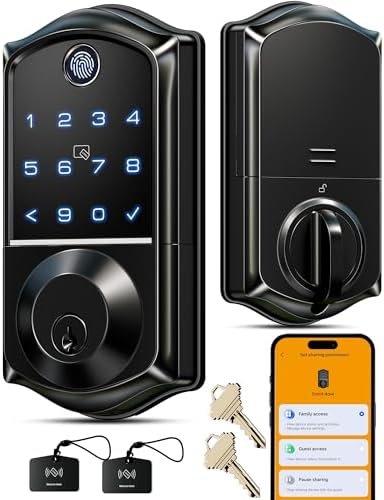
- Smart User Management: Our smart user management system empowers you to take full, remote control of your property acces…
- 8-in-1 Smart Unlock & Locking: Unlock via fingerprint (Swedish FPC tech), App, authorized access, Fob card, code, code s…
- Self-learning AI Fingerprint Recognition: Unlock your door in a blink with our advanced fingerprint system; Powered by a…
3. TEEHO TE001 Keyless Entry Deadbolt – Best for Simple Keypad Access
Not everyone wants a smart lock connected to Wi-Fi or controlled through a smartphone app.
Sometimes, a simple keypad is enough.
The TEEHO TE001 is designed for people who want the convenience of keyless entry without dealing with a more complicated smart home setup.
This electronic deadbolt uses a numeric keypad to provide access through personal passcodes.
It supports up to 20 user codes, making it suitable for households where multiple people need access to the same door.
It also includes a temporary one-time code option for guests.
Once that code has been used, it is automatically deleted.
This can be useful when you need to provide access to someone without creating another permanent household code.
Another practical feature is automatic locking.
You can configure the lock to automatically secure the door after a delay ranging from 10 to 99 seconds.
Alternatively, you can activate the one-touch locking function by pressing and holding any keypad button for two seconds.
The TEEHO TE001 also includes anti-peep password protection, allowing you to enter additional random numbers before or after your actual PIN.
For everyday durability, the lock features an aluminum alloy construction and an IP54 weather-resistance rating.
It runs on four AA batteries and provides a low-battery indicator when the battery level becomes low.
The manufacturer advertises battery life of up to 365 days, depending on usage.
If electronic access isn’t available, two physical backup keys are included.
Key Features:
- Electronic keypad deadbolt.
- Supports up to 20 user codes.
- Temporary one-time access code.
- Automatic locking timer from 10 to 99 seconds.
- One-touch locking function.
- Anti-peep password protection.
- Aluminum alloy construction.
- IP54 weather-resistance rating.
- Four AA batteries required.
- Low-battery indicator.
- Advertised battery life of up to 365 days.
- Two physical backup keys.
- ANSI Grade 3 security rating.
- Two-year manufacturer warranty.
- Designed for installation using a screwdriver.
Why Consider the TEEHO TE001?
The biggest advantage of the TEEHO TE001 is its straightforward approach.
You don’t need to configure a smartphone application, connect the lock to your home network, or purchase a separate gateway for basic keypad access.
Simply set up your access codes and use the keypad when entering or leaving home.
This can be especially appealing if you prefer traditional household security hardware but want to avoid carrying keys everywhere.
The temporary code feature is another useful addition.
You can provide a one-time code for a visitor without needing to share your regular household PIN.
One customer shared their experience after using the lock for more than a year.
Initially, they were concerned about the plastic keypad buttons and wondered whether they would fade, wear out, or become loose over time.
However, after more than a year of use, they reported that the lock still looked like new.
They also appreciated its straightforward installation and found the setup process easy without requiring advanced technical knowledge.
Battery consumption was another positive point in their experience, as they did not find themselves replacing batteries frequently.
Their review highlights why a simpler keypad deadbolt can be an appealing choice: you get convenient keyless access without necessarily needing all the additional features of a connected smart lock.
Who Should Consider It?
The TEEHO TE001 may be worth considering if you:
- Prefer keypad access over fingerprint recognition.
- Don’t need smartphone app control.
- Want to provide individual access codes for family members.
- Need temporary one-time codes for guests.
- Prefer a straightforward installation process.
- Want automatic locking functionality.
- Like having physical backup keys.
- Prefer a simpler electronic deadbolt without Wi-Fi dependency.
Our Take: If your main goal is to replace traditional keys with a convenient keypad, the TEEHO TE001 is a practical option without the added complexity of a connected smart lock.

- Passcode Entry: This keypad lock offers 20 access codes for family use and a temporary code for single-use guest entry
- One-Time Code: A one-time PIN code can be set for door opening and will automatically be deleted after use
- Smart Locking: Features an automatic door lock that can be set to lock in 10-99 seconds (off by default) and one-touch a…
Quick Comparison: Which Keyless Entry Door Lock Fits Your Home?
All three products offer keyless access, but their capabilities are quite different.
The ULTRALOQ and Veise models focus more on smart features and fingerprint access, while TEEHO offers a simpler keypad-based alternative.
Here’s a quick comparison to help narrow down your choices.
| Feature | ULTRALOQ Bolt SE | Veise VE017 | TEEHO TE001 |
|---|---|---|---|
| Lock Type | Smart deadbolt | Smart deadbolt | Keypad deadbolt |
| Fingerprint | Yes | Yes | No |
| Numeric Keypad | Yes | Yes | Yes |
| Smartphone App | Yes | Yes | No |
| Built-in Wi-Fi | Yes | Requires gateway for remote connectivity | No |
| Remote Access | Built-in Wi-Fi / Matter with compatible hub | G1 Gateway required | No |
| Temporary Codes | Yes | Yes | Yes |
| Automatic Lock | Yes | Yes | Yes |
| Physical Backup Keys | 2 | Yes | 2 |
| Smart Home Integration | Apple Home, Alexa, Google, Matter | Alexa/Google with G1 Gateway | Not specified |
| Power | Battery-powered | 4 AA batteries | 4 AA batteries |
| Advertised Battery Life | Up to 18 months | Approx. 12 months | Up to 365 days |
| Best For | Smart home integration | Flexible user management | Simple keypad entry |
Which One Should You Choose?
- Choose ULTRALOQ Bolt SE if you want fingerprint access, built-in Wi-Fi, smartphone control, and smart home integration.
- Choose Veise VE017 if you want fingerprint access combined with flexible user permissions, temporary codes, and multiple unlocking methods.
- Choose TEEHO TE001 if you prefer a simpler keypad deadbolt that doesn’t require an app or internet connection for basic operation.
Remember that smart home compatibility and remote access can depend on additional hardware, network requirements, and configuration.
What to Look for When Buying a Keyless Entry Door Lock
Choosing a keyless door lock involves more than comparing the number of features.
You need to make sure the lock fits your door, provides the access methods you actually need, and is suitable for your home’s existing hardware.
Here are several things worth checking before purchasing.
1. Fingerprint vs. Keypad Entry
Fingerprint recognition is convenient because you don’t need to remember a PIN or carry a key.
However, fingerprint readers may occasionally require another attempt depending on finger placement, moisture, dirt, or recognition conditions.
A keypad provides another straightforward alternative.
If several family members will use the lock, consider whether everyone is comfortable using a fingerprint reader or would prefer individual access codes.
Some models offer both options, providing greater flexibility.
2. Smartphone App and Remote Access
Smartphone control can be useful when you want to manage your door lock while away from home.
Depending on the model, you may be able to:
- Lock or unlock the door remotely.
- Create temporary access codes.
- Share electronic keys.
- Manage family members’ permissions.
- Review access history.
- Receive lock activity notifications.
However, check whether the lock has built-in Wi-Fi or requires an additional gateway.
This distinction matters because some smart locks provide basic app functionality locally while requiring extra hardware for remote access.
3. Automatic Locking
Automatic locking can be a helpful feature for busy households.
Instead of relying entirely on remembering to lock the door, you can configure the lock to secure itself after a preset period.
Some models also include a one-touch locking function.
However, automatic locking does not replace the need to check that your door is properly closed and the deadbolt can extend fully.
4. Backup Access Methods
This is one of the most important considerations when buying an electronic door lock.
What happens if the batteries run out, the fingerprint reader doesn’t recognize your finger, or your smartphone isn’t available?
Look for alternative access options such as:
- Physical backup keys.
- Numeric passcodes.
- Emergency USB-C power ports.
- Alternative app-based access methods.
Having more than one way to access your home can reduce the inconvenience of unexpected situations.
Always understand the emergency access procedure before installing the lock.
5. Battery Life and Low-Battery Alerts
Electronic deadbolts rely on batteries, so battery management matters.
Check the manufacturer’s advertised battery life and whether the lock provides low-battery warnings.
Actual battery life may vary depending on usage frequency, connectivity, environmental conditions, and battery quality.
It’s also worth keeping spare batteries available, especially if the lock is installed on your main entrance.
6. Door Compatibility and Installation
Not every deadbolt fits every door.
Before purchasing, check:
- Door thickness.
- Backset measurements.
- Existing door hole diameter.
- Deadbolt dimensions.
- Required clearance around the door frame.
- Compatibility with left- or right-handed door configurations.
For example, the TEEHO TE001 listing specifies a 2-1/8-inch (54mm) door hole requirement and states that it isn’t compatible with 38mm holes.
Always compare the product’s installation requirements with your existing door before ordering.
7. Weather Resistance and Construction
If your front door is exposed to rain, humidity, or changing temperatures, consider the lock’s construction and environmental ratings.
Look for the materials used in the exterior components and any stated weather-resistance specifications.
For example, TEEHO lists an IP54 rating, while ULTRALOQ uses zinc alloy construction.
However, material descriptions and weather ratings should not be treated as a guarantee against every environmental condition.
8. Smart Home Compatibility
If you already use smart home devices, check whether the lock supports your preferred ecosystem.
Some models work with Apple Home, Alexa, Google Assistant, or Matter-compatible devices.
Be careful to distinguish between direct compatibility and features that require an additional hub or gateway.
Checking these requirements beforehand can help avoid unexpected setup costs and connectivity limitations.
Final Thoughts: Which Keyless Door Lock Is Worth Considering?
Upgrading to a keyless entry door lock can make everyday home access more convenient, especially when several people regularly use the same entrance.
However, the best choice depends on how much technology you actually want in your home.
The ULTRALOQ Bolt SE is an interesting option if you want fingerprint recognition, built-in Wi-Fi, remote access, and smart home integration.
The Veise VE017 is worth considering if you need flexible user management, multiple access methods, and temporary codes for different visitors.
Meanwhile, the TEEHO TE001 offers a simpler approach with keypad entry, automatic locking, and physical backup keys without requiring an internet connection for basic operation.
Before choosing one, make sure to check your door measurements, battery requirements, backup access options, and smart home compatibility.
A keyless lock should make entering and securing your home more convenient, not create unnecessary complications.
Take a closer look at these three options on Amazon and choose the one that best matches your household’s access needs and daily routine.
Frequently Asked Questions About Keyless Entry Door Locks
1. Are keyless entry door locks secure?
Keyless entry locks offer alternative ways to control access to your home, but no lock can guarantee complete security. Look at the lock’s construction, security certifications, access management features, and installation requirements before purchasing.
2. Do smart door locks work without Wi-Fi?
Some smart locks support local keypad or fingerprint access without an internet connection. However, remote smartphone control and certain smart home features may require Wi-Fi, a compatible hub, or a gateway.
3. What happens if a smart lock battery dies?
The answer depends on the model. Some locks include physical backup keys, while others offer an emergency power port or alternative access methods. Always check the manufacturer’s emergency access instructions.
4. Are fingerprint door locks better than keypad locks?
Neither is automatically better. Fingerprint locks offer convenient biometric access, while keypad locks allow users to enter a PIN. Some models combine both options.
5. Can I give temporary access to guests?
Yes, several keyless locks support temporary or one-time access codes. Some smart models also allow you to share electronic keys or schedule access through a smartphone application.
6. Do keyless door locks require professional installation?
Many residential keypad and smart deadbolts are designed for DIY installation using basic tools. However, compatibility with your existing door is important. Follow the manufacturer’s instructions and consider professional assistance if your door requires modifications.
7. How often should I replace smart lock batteries?
Battery replacement depends on the model, usage frequency, connectivity, and battery type. Follow the manufacturer’s low-battery alerts and recommended replacement instructions rather than relying solely on advertised battery life.
8. Can I still use a physical key with a keyless entry lock?
Some electronic deadbolts include mechanical backup keys. Check the product specifications because not every keyless lock offers this feature.