Spending hours at a desk can take a toll on your comfort, especially when your office chair doesn’t provide the support your body needs.
Maybe your current chair feels uncomfortable after a few hours, your backrest doesn’t support your lower back properly, or you constantly find yourself adjusting your sitting position throughout the day.
And if you work from home, study for long hours, or spend most of your day in front of a computer, having a chair that fits your workspace and sitting habits can make a noticeable difference in your daily routine.
That’s why choosing an ergonomic office chair deserves more attention than simply picking one that looks good.
Some chairs focus on adjustable lumbar support and breathable mesh, while others offer flexible armrests, reclining features, or specialized designs for standing desks.
To help narrow down your options, we’ve gathered three ergonomic office chairs worth considering for different work environments and seating preferences.
Whether you need an adjustable chair for a traditional home office, extra flexibility for everyday desk work, or a taller seat for a standing desk, these options offer different features to explore before making a decision.
Disclosure: As an Amazon Associate, I earn from qualifying purchases at no extra cost to you.
At a Glance: Which Ergonomic Office Chair Should You Consider?
Not everyone needs the same type of office chair. Your ideal choice depends on your desk height, body proportions, working habits, and the features that matter most to you.
Here’s a quick overview of the three options:
- Duramont Ergonomic Office Chair: A feature-rich option with adjustable lumbar support, a breathable mesh back, a thick seat cushion, and rollerblade-style wheels.
- marrap Ergonomic Office Chair: A flexible home office chair featuring 3D adjustable armrests, an adjustable headrest, lumbar support, and a rocking function.
- Primy Drafting Chair: A taller ergonomic chair designed for standing desks, drafting tables, and elevated workstations, with flip-up armrests and an adjustable footrest ring.
Let’s look at what each chair offers and the type of workspace it may suit best.
1. Duramont Ergonomic Office Chair – Best for Adjustable Lumbar Support and Everyday Office Work
If you spend most of your day sitting at a desk, finding a chair that allows you to adjust its support to your body can be an important part of creating a comfortable workspace.
The Duramont Ergonomic Office Chair is designed with adjustability in mind, particularly when it comes to lower back support.
One of its standout features is the 4D adjustable lumbar support system. It can move up, down, forward, and backward, allowing users to customize how the chair supports their lower back rather than relying on a fixed lumbar cushion.
This flexibility can be useful because people have different body proportions and sitting preferences.
The chair also offers multiple reclining positions, adjustable armrest height, and customizable tilt tension. These features provide more control over how the chair feels during different activities, whether you’re working, reading, or taking a short break.
Another important detail is the combination of a breathable mesh back and a thick memory foam seat cushion.
The mesh back promotes airflow, while the cushioned seat is designed to provide a more supportive seating surface during extended periods at a desk.
It also features rollerblade-style wheels, which give the chair a different look and are worth considering if smooth movement around your workspace is a priority.
Key Features:
- 4D adjustable lumbar support with multiple positioning directions.
- High-back ergonomic design with an adjustable headrest.
- Breathable mesh backrest.
- Thick memory foam seat cushion.
- Multiple reclining angles.
- Height-adjustable armrests.
- Customizable tilt tension.
- Rollerblade-style rolling casters.
- Reinforced aluminum base.
- Manufacturer-listed weight capacity of up to 350 lbs.
- Warranty information should be confirmed with the current product listing.
Why Consider This Office Chair?
The biggest advantage of the Duramont chair is its range of adjustment options.
Instead of having to adapt your sitting position to a chair with limited adjustments, you can change several components to better suit your preferences.
The adjustable lumbar support is particularly interesting for people who struggle to find a comfortable backrest position with standard office chairs.
One customer shared their experience after upgrading their study space. As a medical student who spent long hours studying, they wanted a chair with more personalized back support.
They particularly appreciated the adjustable lumbar support, which allowed them to position the backrest support according to their needs. They also mentioned liking the adjustable headrest, comfortable seat cushion, and breathable mesh material.
Another detail they appreciated was the assembly process, which they found manageable on their own.
Of course, seating comfort is personal, and one customer’s experience doesn’t guarantee the same results for everyone. However, their feedback highlights why adjustability can be an important consideration when choosing an office chair.
Who Should Consider It?
This chair may be worth considering if you:
- Spend several hours working or studying at a desk.
- Prefer adjustable lumbar support rather than a fixed backrest.
- Want a chair with multiple reclining and adjustment options.
- Prefer a breathable mesh back.
- Like the combination of a cushioned seat and adjustable headrest.
- Want smoother chair movement around your workspace.
Our Take: If personalized lumbar support and multiple adjustment options are high on your priority list, the Duramont is one of the more feature-focused chairs in this selection.
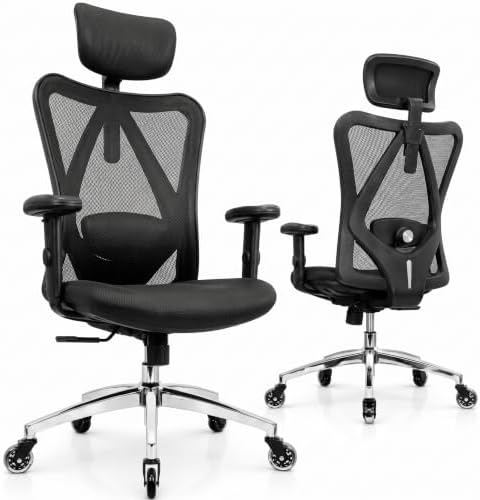
- FULLY ADJUSTABLE LUMBAR SUPPORT FOR OPTIMAL POSTURE – Suffering from back pain or want to prevent it? Our ergonomic desk…
- MORE ADJUSTABLE THAN ANY OTHER CHAIR IN ITS CLASS -Unlike competitor home office desk chairs that only allow you to full…
- BREATHABLE MESH & THICK MEMORY FOAM CUSHION FOR ALL-DAY COMFORT -The high-density breathable mesh back provides superior…
2. marrap Ergonomic Office Chair – Best for Flexible Armrests and Adjustable Seating
A good office chair should do more than provide a place to sit. It should also allow you to change positions comfortably throughout the day.
The marrap Ergonomic Office Chair focuses on flexibility with its adjustable armrests, headrest, lumbar support, and reclining functionality.
One feature that makes this model stand out is its 3D adjustable armrests.
They can flip up, slide forward and backward, and rotate 360 degrees. This gives users more flexibility when positioning their arms while typing, using a mouse, or relaxing between tasks.
The flip-up design can also be useful when you want to move closer to your desk or slide the chair underneath it.
Another important feature is the adjustable lumbar support system, which moves both vertically and forward and backward. This makes it possible to customize the position of the lower back support based on your sitting preferences.
The chair also includes a rocking function with a reclining range of approximately 90 to 120 degrees, along with adjustable tilt tension.
For people who don’t like remaining in exactly the same sitting position all day, this additional flexibility may be appealing.
Its breathable mesh backrest is another practical feature, helping promote airflow during longer work sessions.
Key Features:
- Ergonomic mesh office chair design.
- Adjustable lumbar support with vertical and forward-backward movement.
- 3D adjustable armrests.
- Flip-up armrest functionality.
- Adjustable headrest.
- Rocking and reclining function from approximately 90 to 120 degrees.
- Adjustable tilt tension.
- Breathable mesh backrest.
- Quiet, 360-degree rotating casters.
- Stainless steel construction as listed in the product specifications.
Why Consider This Office Chair?
The most interesting feature of the marrap chair is the flexibility of its armrests.
Armrest positioning can make a difference in how comfortable your desk setup feels, especially if you frequently switch between typing, writing, and other activities.
The ability to move the armrests forward and backward or flip them up gives you more options for adjusting your workspace.
The reclining function also provides another way to change your sitting position when you’re taking a break from focused work.
Its adjustable lumbar support and headrest add further customization, making it an option worth examining if you prefer a chair with several adjustable components.
Who Should Consider It?
This chair may be a good fit if you:
- Want more flexibility in armrest positioning.
- Prefer flip-up armrests for easier desk access.
- Like having an adjustable headrest.
- Want lumbar support that can be repositioned.
- Enjoy a chair with a rocking or reclining function.
- Need a breathable mesh chair for your home office.
Our Take: If adjustable armrests are particularly important to you, the marrap chair offers an interesting combination of flexibility, reclining functionality, and customizable support.
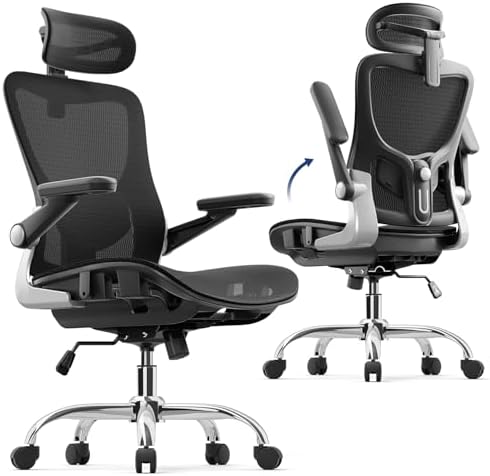
- Adjustable Lumbar Support: Moving up and down and forward and backward, the lumbar support of this ergonomic chair keeps…
- 3D Adjustable Armrests: The armrests on this ergonomic office chair flip up, slide forward and back, and rotate 360 degr…
- 90-120 Degree Rocking: This ergonomic desk chair smoothly rocks from 90 to 120 degrees, adjust the tilt tension as you l…
3. Primy Drafting Chair – Best for Standing Desks and Taller Workstations
Not every workspace uses a traditional desk.
If you have an adjustable-height standing desk, drafting table, or elevated workstation, a standard office chair may not provide the height you need to work comfortably.
That’s where a drafting chair can be a more suitable alternative.
The Primy Drafting Chair is designed with taller workstations in mind. Its elevated seating design allows it to work with standing desks and other higher surfaces, making it an interesting option for people who frequently alternate between sitting and standing.
One of its most practical features is the adjustable circular footrest ring.
When sitting at a higher position, your feet may not naturally reach the floor. The footrest ring provides a place to rest your feet and adjust their position, which can make elevated seating more comfortable.
The chair also includes flip-up armrests, allowing you to move the armrests out of the way when needed.
Its ergonomic backrest features lumbar support designed to follow the natural curve of your back, while the breathable mesh back and thick seat cushion provide additional seating comfort.
The combination of height adjustment, a footrest ring, and flip-up armrests makes this chair different from the two standard office chairs above.
Key Features:
- Tall drafting chair design.
- Adjustable seat height.
- Adjustable circular footrest ring.
- Flip-up armrests for additional flexibility.
- Ergonomic backrest with lumbar support.
- Breathable mesh backrest.
- Approximately 3-inch thick seat cushion.
- High-density foam seat filling.
- 360-degree swivel functionality.
- Five-star base for stability.
- Smooth-rolling casters.
- One-year warranty according to the supplied product description.
Why Consider This Drafting Chair?
The biggest reason to consider this chair is its suitability for elevated workstations.
A regular office chair may not reach the height needed for a standing desk, even when adjusted to its maximum setting.
A drafting chair offers a taller seating position, while the footrest ring provides additional support for your feet.
One customer shared their experience using this chair with an adjustable-height desk. They wanted somewhere comfortable to sit when their body needed a break from standing.
They particularly appreciated the adjustable footrest ring, which worked well for their shorter stature. At approximately 5’3.5″, they mentioned that the seat depth and footrest arrangement suited their needs.
The flip-up armrests were another important feature for them, as they wanted the flexibility to move the armrests out of the way.
They also described the chair as comfortable and appreciated its smooth movement across hardwood flooring.
However, the same reviewer noted that the chair might not be the best fit for taller or heavier individuals. This is a useful reminder that seat dimensions and body proportions should be considered before purchasing.
Who Should Consider It?
This chair may be worth considering if you:
- Use a standing desk or adjustable-height workstation.
- Need a taller chair than a traditional office chair.
- Want an adjustable footrest ring.
- Prefer flip-up armrests.
- Like breathable mesh seating.
- Need a chair for drafting tables or elevated work surfaces.
Our Take: If your workspace includes a standing desk, the Primy drafting chair offers a specialized seating solution that a standard office chair may not provide.

- Adjustable Drafting Chair:This high rotary drawing chair has a foot stool with adjustable height, and the 90 degree over…
- Ergonomic office chair:This ergonomic chair has a curved backrest, which perfectly fits your body curve. There is an adj…
- Soft and Breathable:The breathable mesh back of the seat and the 3 inch thick streamlined seat cushion are soft and elas…
Quick Comparison: Which Office Chair Fits Your Workspace?
Although all three chairs offer ergonomic features, they are designed for somewhat different seating preferences and workspace setups.
Here’s a quick comparison to help narrow down your choices.
| Feature | Duramont | marrap | Primy |
|---|---|---|---|
| Chair Type | Standard office chair | Standard office chair | Drafting chair |
| Lumbar Support | 4D adjustable | Adjustable | Adjustable |
| Headrest | Yes | Yes | Not specified |
| Armrests | Height adjustable | 3D adjustable, flip-up | Flip-up |
| Reclining | Multiple angles | 90–120° rocking | Not specified |
| Backrest | Breathable mesh | Breathable mesh | Breathable mesh |
| Special Feature | Rollerblade-style wheels | Flexible armrests | Adjustable footrest ring |
| Best For | Personalized lumbar support | Flexible seating adjustments | Standing desks |
Which One Makes the Most Sense?
- Duramont: Consider this model if adjustable lumbar support, a cushioned seat, and multiple seating adjustments are your priorities.
- marrap: Consider this option if you want flexible armrests, an adjustable headrest, and a rocking function.
- Primy: Consider this drafting chair if you use a standing desk or need a taller seating position with a footrest ring.
The most important thing is choosing a chair that matches your actual desk setup and body proportions rather than focusing only on the number of features.
What to Look for When Buying an Ergonomic Office Chair
Choosing an office chair can be more complicated than it first appears. Two chairs may look similar but feel completely different once you start using them.
Before making a decision, here are several factors worth considering.
1. Adjustable Lumbar Support
Lower back support is one of the most important features to examine when choosing an ergonomic chair.
Some chairs have fixed lumbar support, while others allow you to adjust its height, depth, or position.
If you find standard office chairs uncomfortable, an adjustable lumbar support system may give you more flexibility when finding a suitable sitting position.
2. Seat Cushion and Material
The seat is where you’ll spend most of your time, so its design matters.
Look for adequate cushioning and a seat shape that feels comfortable for your body.
Memory foam and high-density foam are common options, while breathable mesh backrests can help improve airflow.
Also consider seat depth. A seat that’s too deep or too shallow may affect how comfortably you can sit.
3. Adjustable Armrests
Armrests can influence how comfortably you position your arms while working.
Depending on your preferences, you may want height-adjustable, 3D-adjustable, or flip-up armrests.
Flip-up designs are especially useful when you need to move closer to a desk or want to slide the chair underneath it.
4. Headrest and Backrest Design
If you prefer additional upper-body support, consider whether the chair includes an adjustable headrest.
A headrest may be useful when reclining or taking a break, although its suitability depends on your height and sitting position.
Also pay attention to the overall backrest shape and whether it provides support where you need it.
5. Desk Height and Chair Compatibility
This is particularly important if you use an adjustable standing desk or drafting table.
A standard office chair may not reach the correct height for an elevated workstation.
In that situation, a drafting chair with an adjustable footrest ring may be more appropriate.
Always compare the chair’s height range with your desk dimensions before purchasing.
6. Weight Capacity and Build Quality
Check the manufacturer’s stated weight capacity and the materials used in the chair’s construction.
A reinforced base, quality frame, and durable casters are worth considering, especially if the chair will be used frequently.
Also review the assembly instructions, warranty terms, and available replacement parts.
7. Wheels and Floor Compatibility
Office chair wheels can affect how easily you move around your workspace.
Consider whether the casters are suitable for your flooring, especially if you have hardwood, laminate, or carpet.
Some wheel designs are intended to provide smoother movement, but compatibility and floor protection should always be checked.
Final Thoughts: Find an Office Chair That Fits the Way You Work
The right office chair can make your workspace more comfortable and functional, especially if you spend several hours a day working, studying, or using a computer.
The Duramont Ergonomic Office Chair stands out for its extensive adjustment options, particularly its 4D lumbar support and thick memory foam seat.
The marrap Ergonomic Office Chair offers a flexible combination of adjustable armrests, lumbar support, a headrest, and reclining functionality.
Meanwhile, the Primy Drafting Chair is designed for a different type of workspace, making it worth considering if you use a standing desk or elevated workstation.
There isn’t one perfect office chair for everyone. Your height, desk setup, preferred sitting position, and daily activities all play a role in determining which option makes the most sense.
Before choosing, compare the available dimensions, adjustment ranges, weight capacity, and current product specifications.
A little research now can help you find a chair that better fits your workspace and everyday routine.
https://link.amazon/B00rrDxAG / https://link.amazon/B03yrL3R7 / https://link.amazon/B09leBGRE
Frequently Asked Questions About Ergonomic Office Chairs
1. What is the difference between an ergonomic office chair and a regular office chair?
An ergonomic office chair typically offers adjustable features designed to accommodate different body proportions and sitting preferences. These may include adjustable lumbar support, armrests, seat height, reclining tension, and headrests.
2. Is adjustable lumbar support important in an office chair?
Adjustable lumbar support allows you to change where and how the chair supports your lower back. This can be helpful because people have different body proportions and seating preferences.
3. Are mesh office chairs better for long working hours?
Mesh backrests allow airflow, which may help you feel cooler during extended sitting sessions. However, overall comfort also depends on seat cushioning, backrest design, adjustability, and personal preferences.
4. What is a drafting chair used for?
A drafting chair is designed for taller work surfaces, such as drafting tables, standing desks, and elevated workstations. Many models include an adjustable footrest ring to provide a place to rest your feet when sitting at a higher position.
5. Are flip-up armrests useful?
Yes. Flip-up armrests can provide more flexibility when moving closer to a desk, sliding a chair underneath a table, or changing your seating position.
6. How do I choose the right office chair for my height?
Check the seat height range, seat depth, backrest dimensions, and armrest adjustability. If possible, compare these measurements with a chair you already find comfortable. For drafting chairs, also consider the footrest position.
7. How long should I sit in an office chair?
It’s generally a good idea to change positions and take regular movement breaks rather than remaining seated continuously for long periods. Even a well-designed ergonomic chair should be part of a workspace that encourages regular movement.